

You need to enable Local Network Access for *.lt.app or *.kuracloud.com in site settings:
- Open Chrome.
- Go to *.lt.app or *.kuracloud.com.
- Click the padlock / tune icon to the left of the address bar.
- Toggle Local network access and Apps on Device.
- Refresh the page.

Why you’re seeing this prompt
New versions of Google Chrome (and other Chromium browsers like Microsoft Edge) now show a security popup when a website tries to connect to something on your local network (for example a local helper app, a localhost service, or a device on your Wi-Fi). The popup looks like:
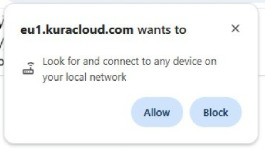
“Allow *.lt.app or *.kuracloud.com to look for local devices?”
“*.lt.app wants to look for and connect to any device on your local network”
This is called Local Network Access. It is a protection introduced by Google to prevent unknown websites from scanning or interacting with devices on your home or office network. A similar concept applies to the Apps on device permission, which blocks unwanted interaction between your browser and applications installed on your machine.
If you clicked Deny, how to fix it (Chrome)
You can re-enable Local Network Access for *.lt.app or *.kuracloud.com in site settings:
- Open Chrome.
- Go to *.lt.app or *.kuracloud.com.
- Click the padlock / tune icon to the left of the address bar.
- Select Site settings.
- Find Local network access (sometimes shown as “Look for local devices”).
- Find Apps on device
- Change them to Allow.
- Refresh the page.
Alternative path
- Chrome menu ⋮ → Settings
- Privacy and security → Site settings
- Open Additional permissions (or search for “local network access”)
- Select Local network access and Apps on device
- Under “Allowed to access local network,” and "Allowed to access Apps on device" add or switch *.lt.app or *.kuracloud.com to Allow
Why you need to click Allow for *.lt.app or *.kuracloud.com
*.lt.app or *.kuracloud.com uses a secure local connection to enable features like:
- Detecting/connecting to a kuraCloud Desktop Application
- Detecting/connecting with PowerLab/Sampling devices on your network
If you click Deny / Block, the browser prevents *.lt.app or *.kuracloud.com from talking to that local service/device, and some features may not work.