A step-by-step guide and video for setting up your exercise physiology equipment
ADInstrument Exercise Physiology solutions allow your students to conduct respiratory gas analysis and metabolic measurements, providing hands-on experience for investigating the effects of exercise.
In this quick start guide, we will detail how to get your exercise physiology equipment set-up for experimentation, and demonstrate how the data is managed through LabChart. Follow along using the procedural steps and videos below.
Equipment List:
- PowerLab 26T (with associated cables, wires, and adapters)
- LabChart Software
- Exercise Physiology Kit
- Gas Analyzer
- Gas Mixing Chamber
- Spirometer
- Respiratory Flow Head (1000 L)
- Face Mask
- Flow Head Adapter
- 35 mm ID Adapter
- Breathing Tube
- Desiccant Cartridge with Drying Tubes
- Silicon Tube with Luer Fittings (x2)
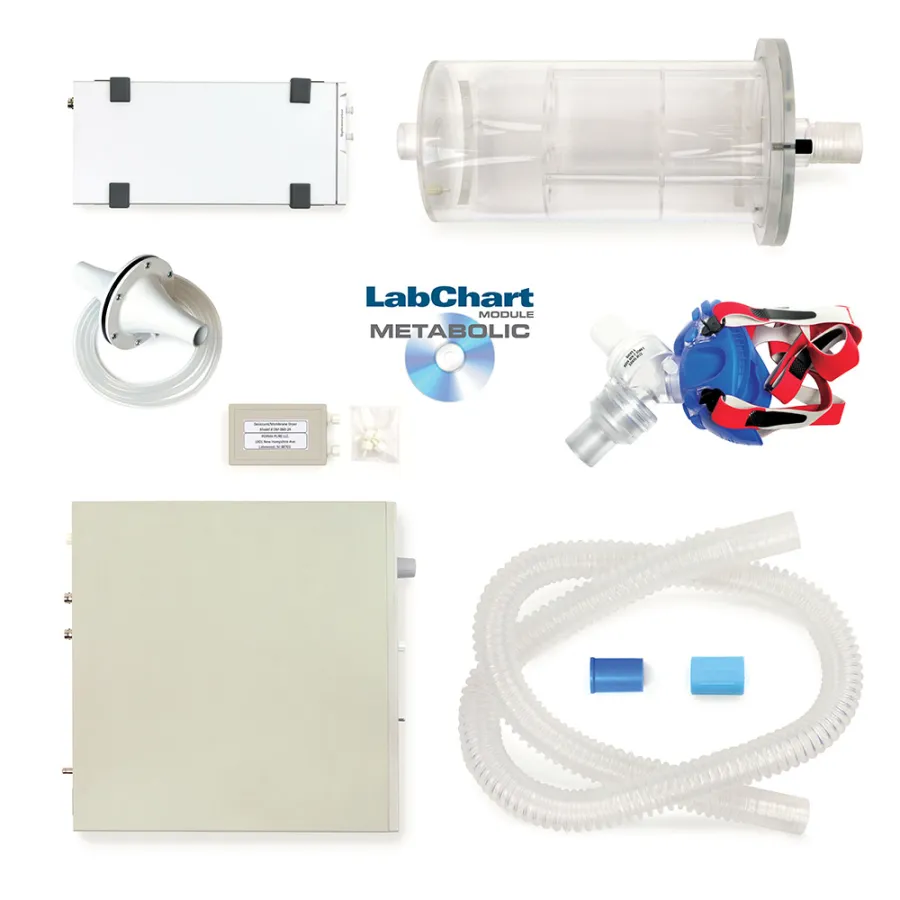
Exercise Physiology Teaching Kit [Product Code: PTK14]
Equipment Set-Up
You will begin by connecting your PowerLab to the Gas Analyzer via an I2C cable. Identify the I2C connection on the back of your PowerLab, and connect one end of the I2C cable here. Then identify the I2C input on the back of your Gas Analyzer, and connect the other end of the I2C cable here.
Next, you will set up the O2 and CO2 connections between the PowerLab and Gas Analyzer*. Identify the O2 and CO2 outputs on the back of your Gas Analyzer. For O2, use a BNC cable to connect the output to Input 1 on the front of your PowerLab. For CO2, use a BNC cable to connect the output to Input 2 on the front of your PowerLab.
*Please note that you will need two BNC to DIN adapters for a PowerLab 26T. Connect these adapters into Input 1 and Input 2 on the front of your PowerLab 26T prior to establishing the O2 and CO2 connections via BNC cables.
Connect your Spirometer Pod to Input 3 on the front of the PowerLab.
Take your Bio Amp cable and connect it to the respective panel on the front of your PowerLab. This panel will have a “Bio Amp” label for clear indication. Attach the shielded wires to the corresponding colors on the other end of the Bio Amp cable.
This will complete the front connections of your PowerLab.
Next, take your silicon tubing and connect them to both of the ports on the back of your spirometer pod. The other ends of the silicon tubing will connect to the ports on your 1000 L Flow Head.
Place a Flow Head Adapter on the end of the Flow Head.
On that same end of the Flow Head, attach a Tubing Adapter over the Flow Head Adapter.
Now you will work on connecting your Gas Mixing Chamber. Please ensure that your Gas Mixing Chamber is placed on a flat surface. Attach the Flow Head to the base of the Gas Mixing Chamber using the end with the Tubing Adapter.
On the other end of the Gas Mixing Chamber, attach your clean bore tubing. Finally, connect your Face Mask to the other end of the clean bore tubing.
Next, you will need your Desiccant Cartridge and drying tubes. Attach the drying tubes to both ports on the Desiccant Cartridge. For one of your lines of dry tubing, attach the end to the Sample input on your Gas Analyzer. For the other line of dry tubing, attach the end to the port on the Tubing Adapter.
This should complete your Exercise Physiology Kit set-up.
Finally, connect your PowerLab and Gas Analyzer to a power source and turn each on. Power will be indicated by a light on the front of each respective system. Connect your PowerLab to your computer via the USB connector on the backside and a USB cable. You are now ready to begin collecting data with your set-up!
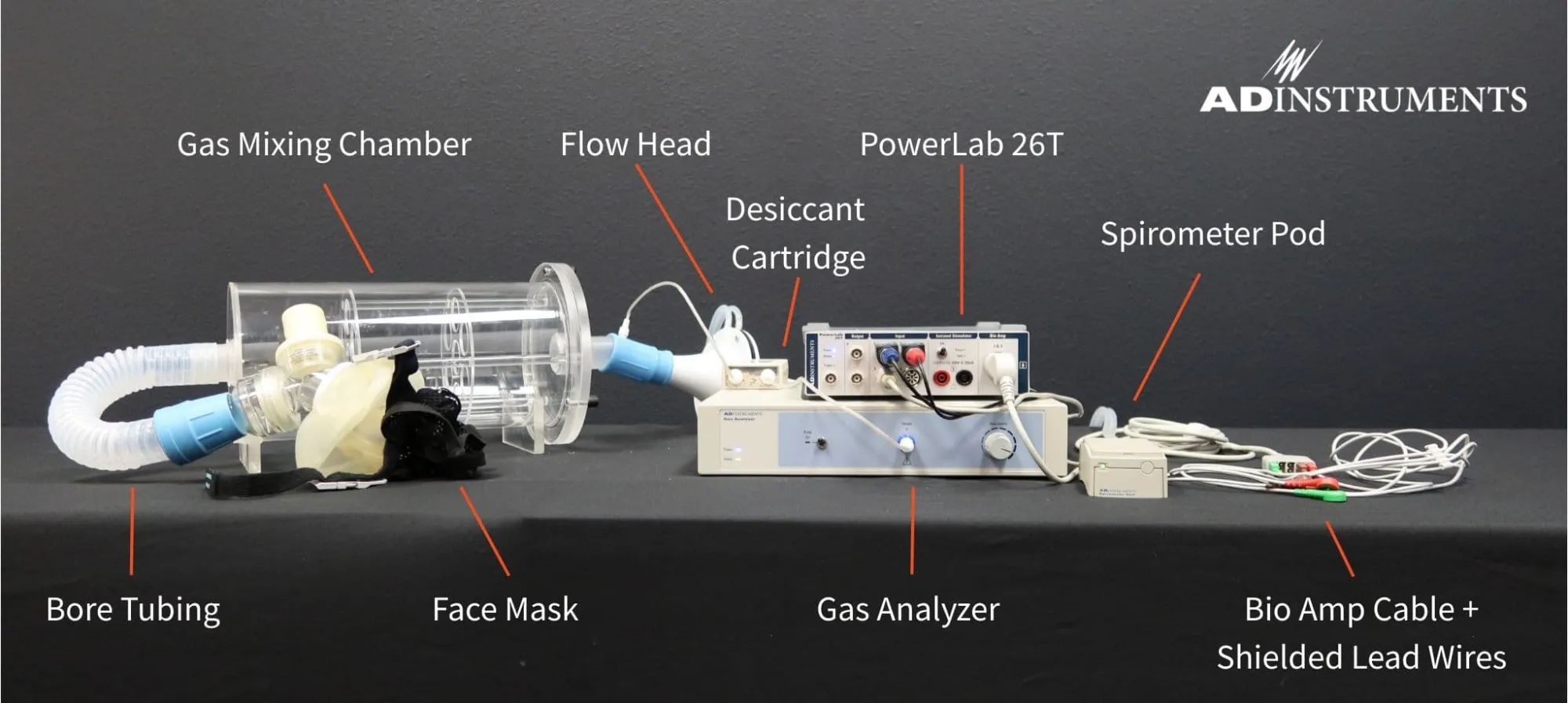
The complete hardware set-up for exercise physiology teaching equipment
LabChart Analysis
In this video, our education specialist provides an overview of the Introduction to Exercise Physiology experiment in LabChart. This experiment aims to introduce students to spirometry and gas analysis as techniques for recording respiratory variables and determining the metabolic rate. During the course of the experiment, students will observe changes in gas levels and respiratory rates. A volunteer subject will begin at rest, and then increase their intensity of exercise from light to vigorous.
The preconfigured channels in the experiment will ultimately provide students with the following data for analysis:
- Percent oxygen consumption
- Percent carbon dioxide production
- Temperature
- Airflow
- ECG
- Respiratory Rate
- Heart Rate
- Calculated Tidal Volume
If you have additional questions or require further support when setting up your exercise physiology hardware, please contact our team here.