No matter where you stand on the subject, it’s undeniable that AI is at the forefront of conversation when we discuss the future of technology in education. Understandably, there are numerous concerns surrounding the use of AI tools in the classroom - including student dependence and ethical challenges, accuracy of the outputs from these tools, and privacy concerns when it comes to student data.
For educators who are looking to stay ahead of the curve, the idea of safely and effectively integrating AI technology can be daunting.
Where do I even start? How much time will it take to implement? Are they safe? What costs are associated? Is it beginner friendly?
These are probably just a few of the questions that you’ve asked yourself while exploring some of the tools that exist. By the time your head stops spinning, you’re likely left with a massive headache and the feeling of being entirely overwhelmed with no clear starting point.
Dr. John Zubek, Associate Professor in the Department of Physiology at Michigan State University, understands these hurdles and is working to ethically leverage AI tools for his teaching. At the 2024 Physiology Majors Interest Group (P-MIG) meeting, John teamed up with Dr. John Kanady, University of Arizona, to facilitate a session on the use of generative AI in education and discuss his experience using chatbots to increase student engagement in human physiology courses. Read on to see what was covered during the session and learn how you can begin to implement these tools for your own teaching.

Physiology Majors Interest Group
How to approach and navigate AI tools
At the start of the session, attendees were asked the following question: “Do you utilize AI in your teaching, research, job, or personal life?”
Approximately 50% of participants responded that they had used it “only a few times ever” - an answer that wasn’t surprising to John.
“Nobody really has time to explore. They'll dabble in it, they'll do a couple things, and then they'll be like ‘Yeah, that's cool. What am I gonna use it for?’ or ‘I don’t like that output, so it stinks.’ ”
Looking to enhance general proficiency and comfort with AI tools, John and collaborators put together an approach for navigating these tools with iteration and development at the heart of it all.
“What we are trying to emphasize with people is that it does require some iterations if you're really interested in doing something more efficiently or gathering information. It's not a one shot deal, you do have to train it a little bit. But that doesn't mean it takes forever, and it doesn't require an expert. So our hope is to at least show that even novices can get some use out of it.”

AI Utility Navigator Diagram. Credits: John Zubek (Michigan State University) and John Kanady (University of Arizona)
Using the above as an example, John laid out a framework to show how anyone can get started with AI tools using a series of simple steps:
- Identify the Problem: To start, John suggests sitting down and asking yourself a simple question: “What's one thing in my day I wish I could do a bit faster or a bit more efficiently?” Starting with one initial problem makes it much easier to plan, implement, and make iterations upon.
- Categorize the Problem: The next goal is to match your specific problem with a broader category (ex. Content Creation, Data Analysis, Student Engagement, Administrative Tasks, or Personalized Learning). This will help you to determine the appropriate tool to use later on.
- Determine the Complexity: Categorizing your problem will help you in assessing the complexity of it. Complexity can be broken down into the following levels:
- Easy: Can be solved with a single tool
- Intermediate: May require more than one tool or a greater level of AI sophistication.
- Difficult: Involves the integration of multiple tools (AI or mixed tools) and/or a very high level of AI tool sophistication.
- Select the AI Tool: Now it’s time to select the appropriate AI tool(s) based on your problem category and complexity. John and other presentation collaborators have helped to lay out some initial examples to get you started:
- Voice Over > use Eleven Labs
- Student Tutor > use Khanmigo
- Research > use Elicit
- Large Language Models and Data Analysis (tools with multiple uses) >
- Plan the Implementation: Develop an implementation plan that outlines how you will integrate the AI tool. John suggests utilizing a “Plan-Do-Check-Act” cycle that allows you to gather results to guide your decision making when it comes to future iterations. Ask questions like - Did the tool give you what you wanted? Was it how you envisioned it? What could you change next time in your prompting?
Pro Tip:
“We're finding that if you're looking for technical stuff, like tables or transferring dates from one syllabus to another, a tool such as Claude is actually way better at that than ChatGPT. But if you're looking for assistance with something such as getting the wording right in an important email to your dean, a tool like ChatGPT works just fine and can save you a half an hour. You don't have to let it write it for you, but you can write all your thoughts down and then ask it to give you some tips.” -John Z.
John emphasizes that the most important part in all of this is the “willingness to check and then react again.” If your goal is accuracy and efficiency, putting in a bit of effort upfront to appropriately train yourself and the AI tool can save you lots of time down the road.
“Don't take it as just a singular opportunity. This is an opportunity to learn something that will make your life more efficient in the future,” John notes.
What does this approach look like in action with students?
John has dabbled in quite a few AI tools and has worked to test and incorporate some of these technologies into his teaching. Doing so has allowed him to enhance student engagement and save himself time on administrative tasks. His focus lately has been on exploring the use of custom chatbots for students in human physiology courses.
Following a series of preliminary supervised sessions with students to test and scaffold the process, John has now reached a point where he has created and trained two chatbots using ChatGPT (a tool approved on his campus for use by students). He has named these chatbots J-Bot and PhysioWhiz.
“J-Bot I use for my lab students and PhysioWhiz I use for my online introductory physiology students that I teach in the summer.” In regards to his summer students, he goes on to explain “I don't see those students at all in person, and I know they always need some extra help with complex concepts.”
The chatbots can provide students with extra help and are available 24/7. John has customized these tools using the content from his courses and trained them to be socratic in their responses, prompting students rather than simply spitting out the answer. He has even set restrictions on them to keep the outputs focused on only the content related to his course.
“If a student asked ‘Tell me about the Mona Lisa’ for example. The chatbot would respond ‘I'm sorry. You will have to talk to Professor Zubek about that subject because that's not a part of my training.’ ”
The chatbots serve to help students with a variety of tasks, such as narrowing down their questions, exploring complex concepts further, providing information from the syllabus such as exam dates, and more!
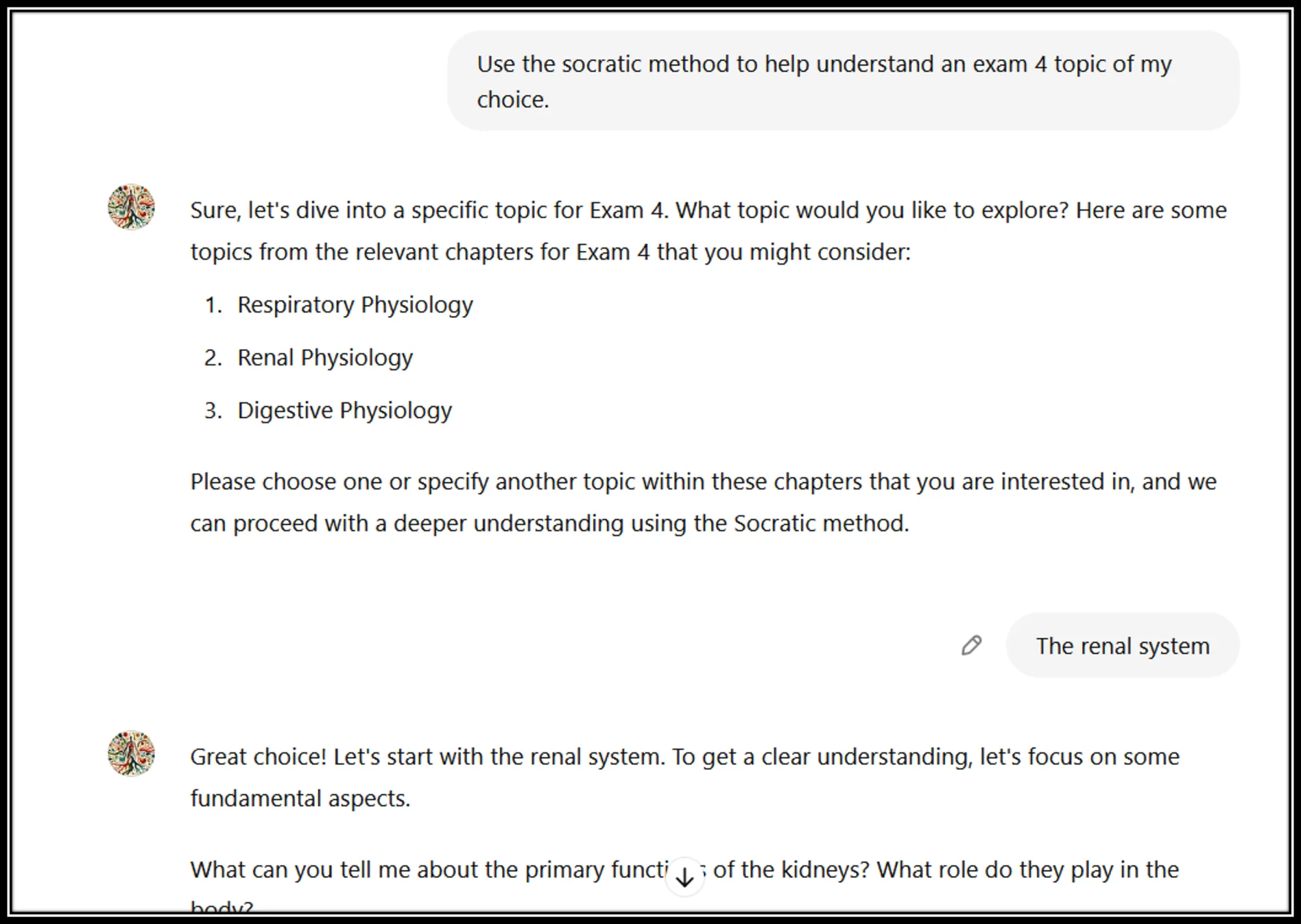
Example of a conversation with PhysioWhiz, indicating how PhysioWhiz helps to prompt the user by suggesting relevant topics and asking questions about what the user already knows. Credits: John Zubek (Michigan State University) and Chris Shaltry (Michigan State University)
Student feedback was collected and reflected a positive experience utilizing the chatbots, with 80% rating J-Bot effective in guiding their critical thinking.
Student Feedback:
"I liked that I could ask the chatbot questions to clarify and re-explain concepts and ideas that I was confused about.”
"It was great! I used it to quiz me, write practice problems, and help with what to write on my flashcard.”
“I just like how it was focused around our course. Therefore it already knew some background about why I'm using it in the first place.”
Demonstrating responsibility
When all is said and done, John really hopes that students will walk away with a better understanding of how to use these tools responsibly. Knowing that you can’t stop students from accessing AI tools, he approaches it with the outlook that he can give them the skills to critically evaluate the outputs.
“I don't discourage my students from using ChatGPT, but they have to use it responsibly. So I’m demonstrating that responsibility. Of course the question is, how do you hold them to that? We have guidelines around it, but I'm also showing them how to prompt it. Trying to demonstrate during the labs what an appropriate use of that might be in their learning process. Then, I actually have them put some content into an AI bot, see what comes out, and see if they can correct it,” he explains.
“Creating from scratch is one thing of course, but critically evaluating something for correctness and suggesting modifications is a skill that they're going to really need as well. So now, hopefully they will recognize that the chatbot is fallible or not great in all instances.” - John Zubek
Going the extra step with this, John has decided to incorporate critical evaluation of AI outputs as a graded portion of his students’ labs in the future.
“They're going to have to take question number five in their Lt lab, for example, and run it through an AI tool ... They'll have to evaluate the response for correctness, evaluate for flow, evaluate the mechanism. Asking questions like - Is the information correct? Is it in the right order? Is this the most up to date? Those kinds of things. And then they will use a resource to back it up.”
“They are using AI tools, but they're also going to have to take a moment to evaluate them…All through the process, we can teach students how to utilize these tools to evaluate them throughout the entire process instead of at the very end.”
By demonstrating responsible use, John is hoping that AI tools will become a productive tool for both educators and students as they continue to develop and become more widely accessible.
ADInstruments would like to thank John for sharing his insights, resources, and experiences with AI.
If you would like to learn more about how John is incorporating AI technology into his teaching, you can view his Brain Trust 2025 presentation, AI as Your Teaching Assistant: Practical Strategies for Enhancing Lab Instruction, here!

John Zubek, DPT
John Zubek, DPT
Associate Professor
Department of Physiology
Michigan State University
John focuses on providing basic science education paired with enrichment opportunities for students entering the health professions such as Physical and Occupational Therapy, Physician Assistant, Medical, Pharmacy, and Nursing.