HRV
Heart Rate Variability (HRV) Analysis Software
The Heart Rate Variability (HRV) Module for LabChart analyzes beat-to-beat interval variation in ECG recordings or arterial pulse signals.
Download SoftwareFrequently purchased with HRV


Overview
The Heart Rate Variability (HRV) Module for LabChart analyzes beat-to-beat (RR) interval variation in ECG recordings or arterial pulse signals coming from humans or animals. HRV analysis can be performed on a previous ECG recording or while data is being sampled. The Heart Rate Variability Software Module automatically detects beats by finding the R wave in the ECG signal and classifies beats into Normal or Ectopic based on the presets (or custom settings) the user chooses. Beats can be manually added or removed during the HRV data analysis.
The HRV Module is included as part of LabChart Pro or can be purchased separately.
HRV Analysis Software Built Into LabChart
The HRV Module is HRV analysis software that works directly on your LabChart recordings, so beat detection, RR interval analysis and parameter calculation all happen in the same environment as your acquisition. It performs HRV analysis from an ECG recording or from arterial pulse data, in humans or animals, either offline on a previous file or on data as it is being sampled - automatically finding each R wave and sorting beats into normal or ectopic against your chosen presets or custom classification limits. Because artefacts can be excluded and individual beats added or removed by hand, you keep full control over which intervals feed the analysis, without exporting to a separate package. The module is available as part of LabChart Pro or as a standalone add-on for an existing LabChart installation.
Key Features
- Detection and analysis of R waves & RR interval variation in ECG in real-time or offline.
- HRV Software ideal for animal and human cardiovascular studies.
- Automatically classify beats as normal or ectopic from animal presets or user-selected interval classification limits.
- Exclude artifacts or include beats in the analysis on an individual basis.
- Adjustable histogram bin size.
- Automatic generation of clinically accepted statistical parameters.
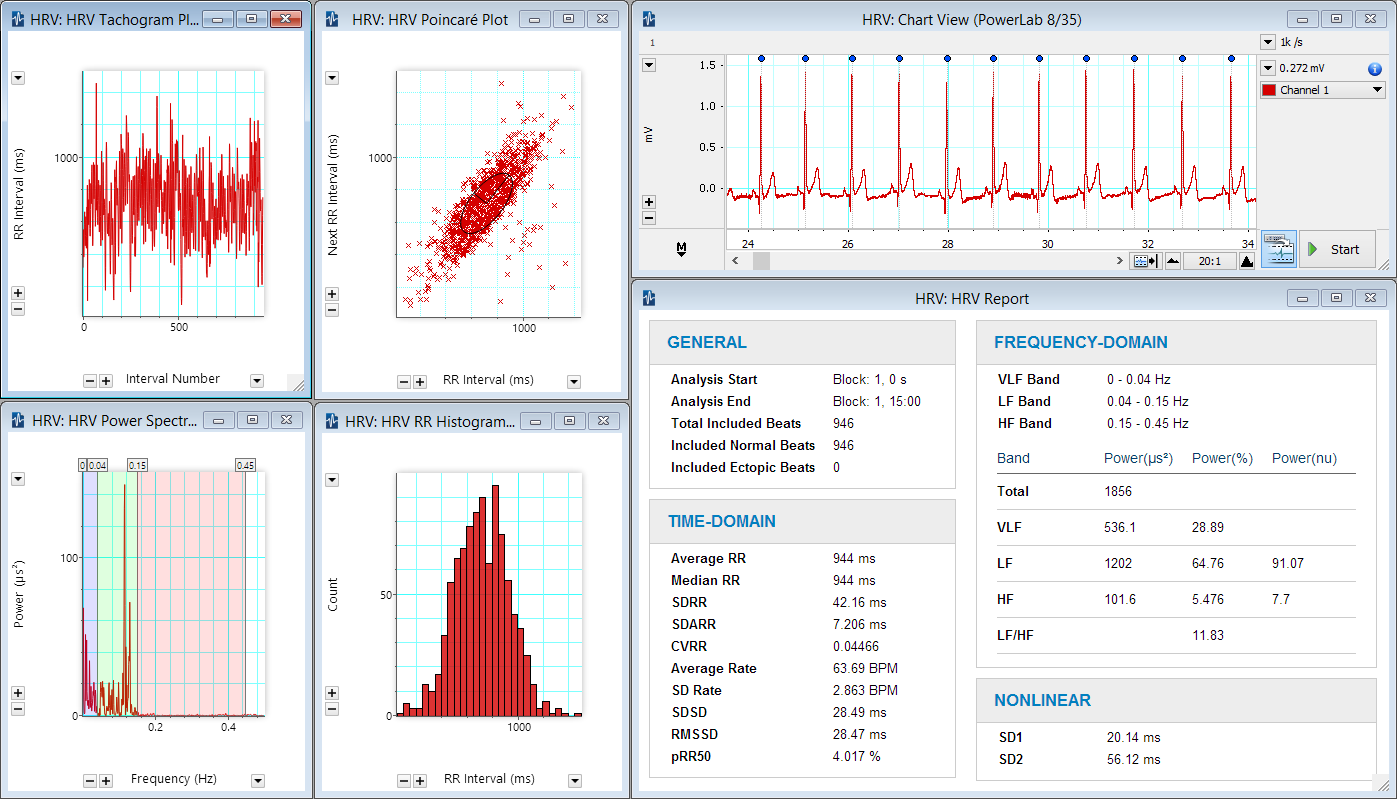
- Specialized HRV data analysis plot windows derived from RR interval data includes:
- Poincaré Plot: scatter plot where each RR interval is plotted against its preceding RR interval.
- Period Histogram: displays the frequency distribution of RR intervals.
- Delta RR Histogram: displays the frequency distribution of differences between each RR interval and its successor.
- Tachogram plots: successive RR interval values against the ‘beat number’.
- Spectrum: displays the power spectrum of time-based Tachogram, also referred to as the 'Spectrum of Intervals'. Draggable vertical lines indicate limits of LF and HF regions of the spectrum.
- Automatic generation of exportable and printable report displaying HRV analysis statistical results.
- All HRV windows are linked for immediate update when modifications are performed.
Related
Research Applications
Signals
Support
Support Assistant
Our Support Assistant can answer common questions and provide solutions.
Go to Support AssistantTraining and Workshops
Maximize time and resources with our customized training services delivered at your facility, on your equipment, on your terms.
See Training & WorkshopsDetails and Tech Specs
Technical
Compatibility
| LabChart 8 for Windows | checkmark |
| LabChart 8 for Mac | checkmark |
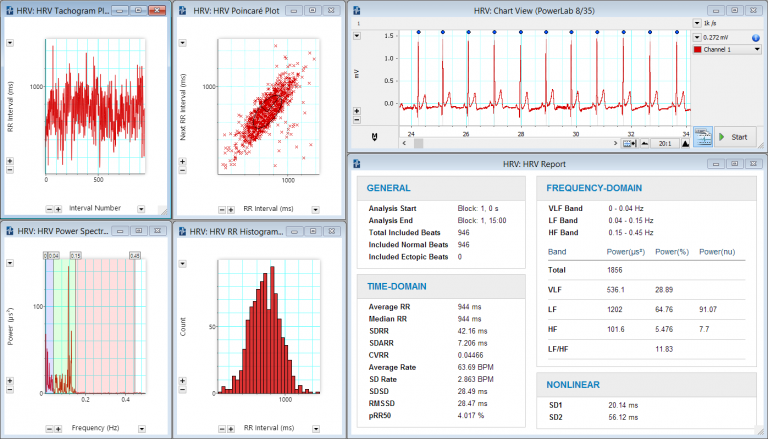
Using the HRV Add-On you can easily generate Tachogram, Poincaré, Power Spectrum and RR Histogram plots from an ECG. Delta RR Histogram plots are also available.
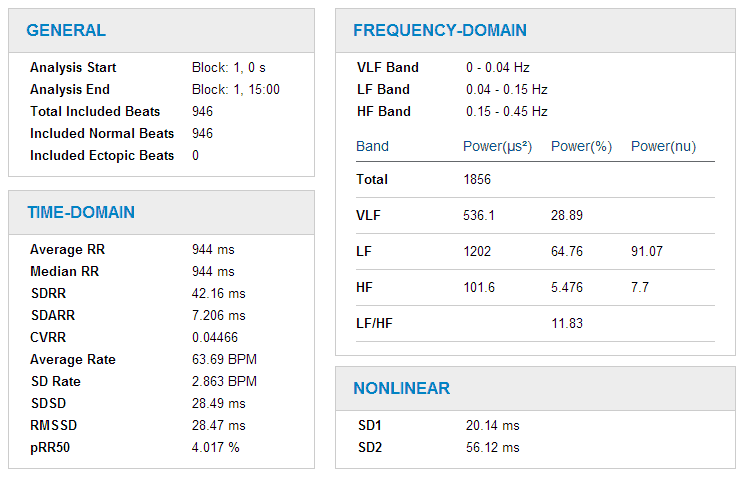
The Report highlights the nonlinear, time-domain, and frequency-domain results.